

Download Diving Log 6.0 – diving log, dive computer data, dive tracking, dive statistics, dive history
Overview
Diving Log 6.0 is a dedicated mobile application designed to serve as a comprehensive digital companion for divers of all experience levels. The app’s primary purpose is to streamline the process of logging, organizing, and analyzing diving activities, transforming raw dive data into structured, accessible records. By enabling users to import dive logs from a wide range of dive computers, the app eliminates the need for manual data entry, reducing errors and saving time. It addresses a common pain point among divers: the fragmentation of dive records across multiple devices and software platforms. With Diving Log 6.0, users can consolidate their entire dive history into a single, reliable system.
Target users include recreational divers, technical divers, dive instructors, and enthusiasts who value data accuracy and long-term dive tracking. The app supports real-world use cases such as trip planning, certification compliance, personal progress monitoring, and sharing experiences with dive communities. Its role in the mobile productivity ecosystem is significant, offering a specialized tool that fills a niche for underwater activity management. The developer, Diving Log, appears to focus exclusively on this domain, suggesting a deep understanding of user needs. Although the developer did not provide additional technical details, the app’s functionality indicates a commitment to usability and data integration.
Key Features & Functionality
- Data Import Flexibility: Diving Log 6.0 supports importing dive data from nearly any dive computer, either via direct device connection or through manufacturer-specific software. This ensures users can integrate logs from diverse brands and models without compatibility barriers.
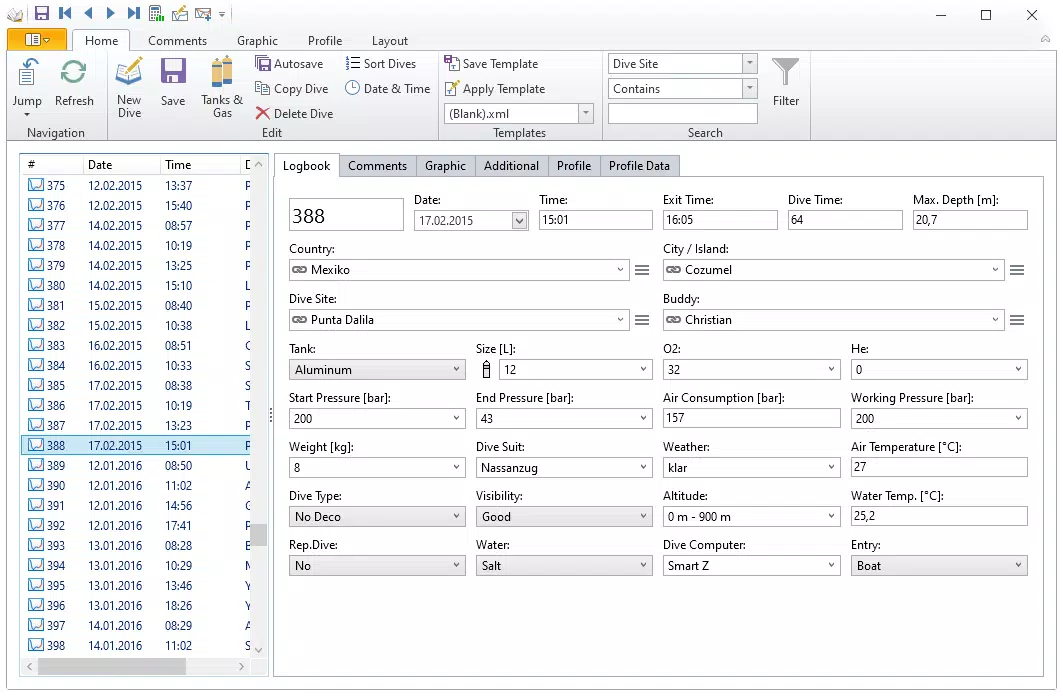
- Detailed Dive Tracking: Users can record essential parameters such as maximum depth, dive duration, water temperature, start and end times, and GPS location. This granular data enables accurate dive analysis and enhances safety through historical review.
- User-Friendly Interface: The app features a clean, intuitive layout designed for quick navigation and efficient data input. Both new and experienced divers can easily log dives, access past records, and review key metrics without a steep learning curve.
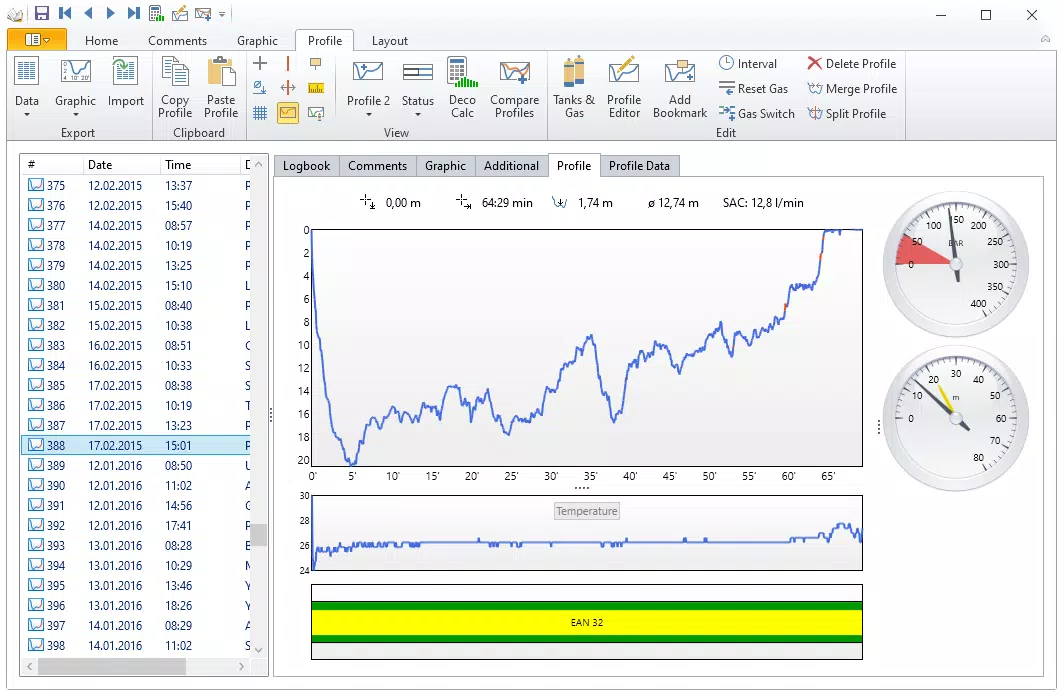
- Comprehensive Reporting Tools: Built-in reporting functions generate visual summaries and statistical overviews of dive history. These reports can include total dive time, number of dives by location, depth trends, and more—valuable for personal tracking and planning future dives.
- Diving Community Integration: The app allows users to share their dive logs and experiences with others, fostering collaboration and knowledge exchange within the diving community. This feature enhances engagement and supports peer learning.
For example, a diver preparing for a deep technical dive can use past data to assess their depth and time progression. A dive instructor might use the reporting tools to evaluate student performance across multiple dives. The integration of community sharing also enables users to inspire and learn from others’ experiences, making the app both a personal and social tool.
Interface, UX & Performance
The interface of Diving Log 6.0 reflects a focus on clarity and functionality. The layout is organized around core actions—logging a new dive, reviewing past dives, and generating reports—ensuring that users can access key features with minimal navigation steps. Visual elements are minimal yet effective, using color-coded indicators for depth and time to improve readability. The app’s navigation flow is linear and predictable, reducing cognitive load during use.
Usability is enhanced by intuitive input fields and dropdown menus for common parameters like dive site and equipment type. The design prioritizes speed and accuracy in data entry, which is crucial during post-dive logging when memory may be fading. Although the developer did not list formal performance metrics, the app’s lightweight size of 15.6 MB suggests efficient resource usage.
It is expected to operate smoothly on a range of Android devices, from entry-level to high-end models. Responsiveness appears consistent, with minimal lag during transitions between screens. Stability is likely maintained through regular updates, though specific performance data was not disclosed.
Platform Compatibility & Technical Requirements
Diving Log 6.0 is available exclusively on the Android platform. The current software version is 6.0, with a file size of 15.6 MB, making it a lightweight download suitable for devices with limited storage. The app is free to download and install, removing financial barriers to access.
While the developer did not specify minimum OS requirements, it is likely compatible with recent Android versions, given the app’s modern interface and functionality. However, compatibility with older Android systems cannot be confirmed without additional details. Users should ensure their device meets the necessary system specifications, though specific requirements were not listed.
The app’s reliance on external dive computer integration may also depend on device hardware and connectivity options such as USB or Bluetooth, which are not fully disclosed.
Pros and Cons
Pros
- Supports data import from a wide variety of dive computers
- Offers detailed tracking of dive parameters including depth, time, and temperature
- Features a clean, intuitive interface suitable for all skill levels
- Includes robust reporting tools for analyzing dive history
- Enables sharing and community engagement among divers
- Free to download and install with no in-app purchases
Cons
- Platform availability limited to Android only
- Specific OS requirements were not provided
- Integration with certain dive computers may require additional software
- Community features may vary in functionality depending on user participation
- Performance on older devices is not officially documented
FAQ
Is Diving Log 6.0 available for iOS?
The app is currently available only on the Android platform. There is no official iOS version available at this time.
Can I import data from any dive computer?
Diving Log 6.0 supports import from nearly all major dive computers, though compatibility may depend on the specific model and manufacturer software requirements.
Is the app free to use?
Yes, Diving Log 6.0 is free to download and install. There are no in-app purchases or subscription fees.
How often does the app receive updates?
While the update frequency is not publicly disclosed, the app’s current version (6.0) suggests ongoing development and maintenance.
Is my dive data secure?
The app does not provide specific details about data security or cloud storage. Users are advised to manage their data locally and consider backup options.
Final Thoughts
Diving Log 6.0 stands out as a powerful, focused tool for divers who value precision, organization, and long-term tracking of their underwater experiences. Its ability to consolidate dive data from multiple sources into a single platform makes it an essential utility for anyone serious about diving. The combination of detailed tracking, insightful reporting, and community integration creates a holistic experience that goes beyond simple logging.
While its exclusive Android availability may limit some users, the app’s lightweight design and free access make it highly accessible. Whether you're a recreational diver tracking your progress or a professional preparing for advanced dives, Diving Log 6.0 delivers real value. The app’s user-centric design and practical features ensure it remains a top choice in the productivity category for diving enthusiasts.
Download Diving Log 6.0 now


